NewVersion 0.3.6 · now on Android too

You run your tasks.
Not the other way around.

checkst is the calm to-do app for Windows. Your tasks live in a plain todo.txt: local, open and still readable ten years from now.

Free and open source · Windows 10 and 11 · Android · 13 MB

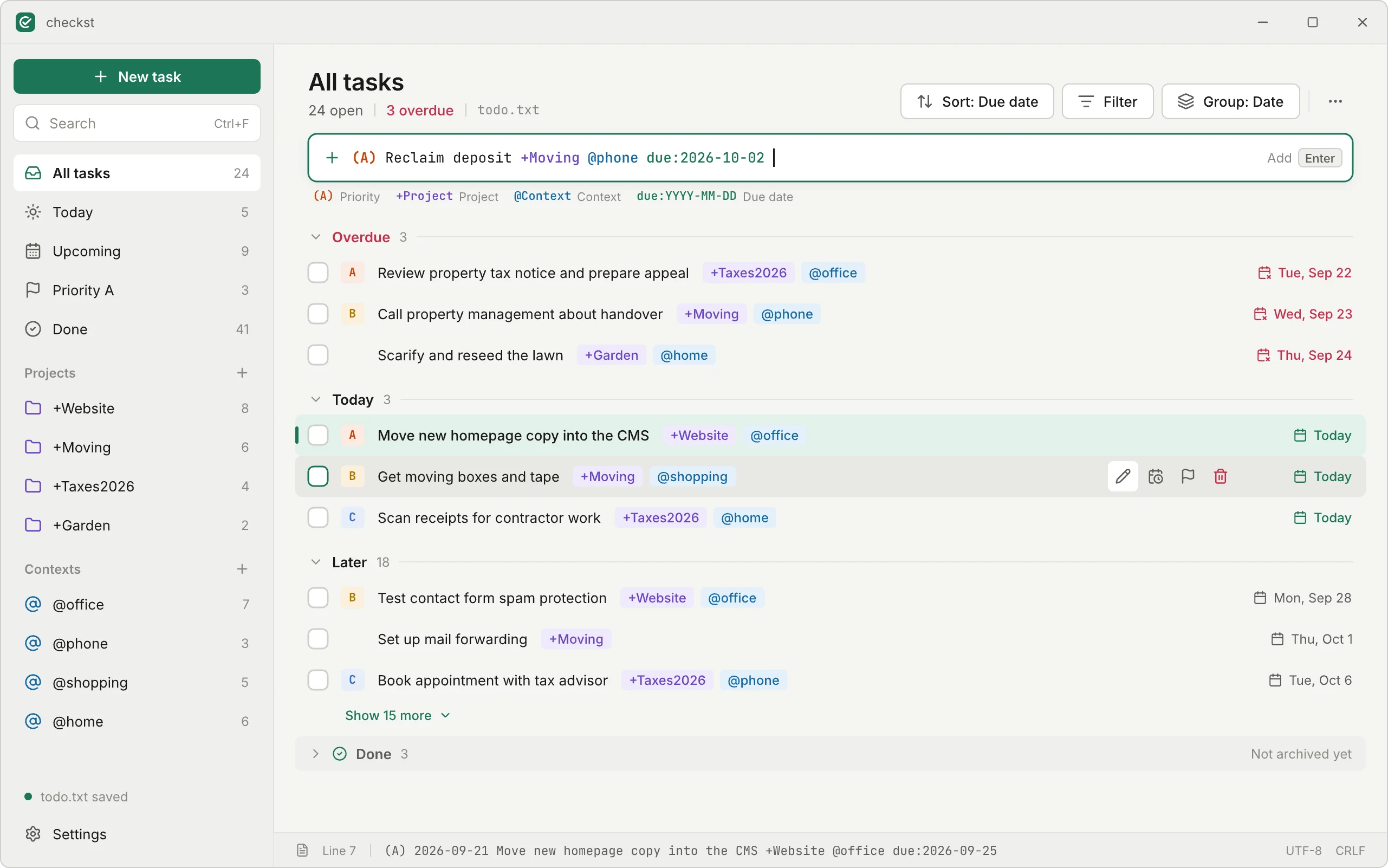
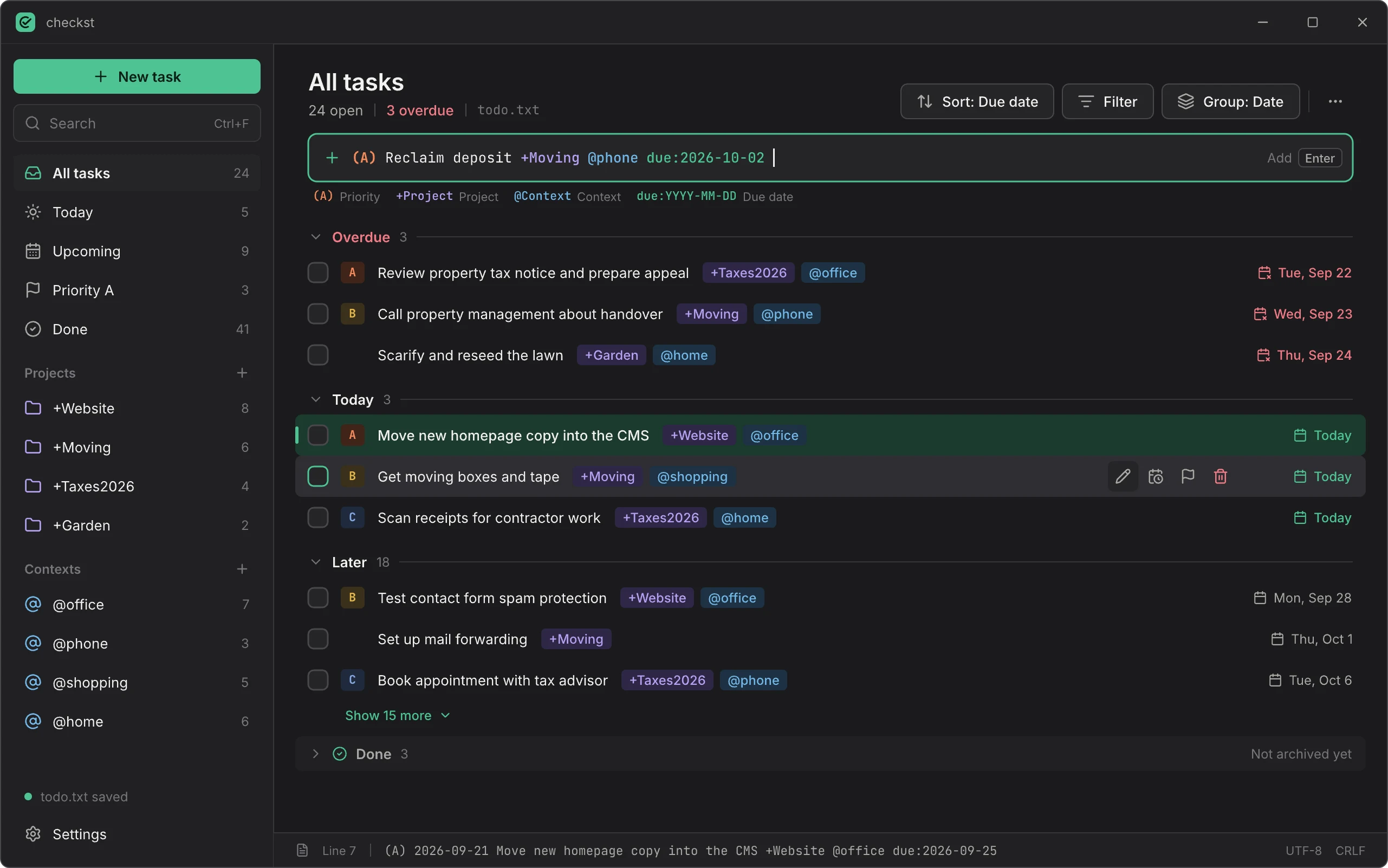
The main view of checkst with tasks, projects and contexts The main view of checkst with tasks, projects and contexts
Works with OneDrive Dropbox Git Syncthing any text editor

Features

Everything a task list needs. Nothing that slows you down.

Keyboard first, mouse optional.

Just start typing.

One line is one task. Type priority, project, context and due date inline, and checkst recognizes and highlights them instantly.

(A) Send quote to client +Website @office due:2026-10-02
A Send quote to client+Website@office Fri, Oct 2
(A)Priority+ProjectProject@ContextContextdue:Due date

Capture from anywhere.

One shortcut opens the input bar over any app. Type the task, hit Enter, keep working.

Ctrl+Alt+T
Call the dentist@phone+Garden
Will be saved asCall the dentist @phone +Garden
Existing projectsby frequency
+Garden2 open tasksTab

Today, always in view.

Pin today's tasks to your screen as a small note. It stays above all windows, and you can move and resize it freely. Check things off or type new ones right there.

  • Above all windows
  • Move and resize freely
  • Suggestions as you type

Everything in one right click.

Right-click a task for its quick actions: check it off, reschedule it, set a priority, duplicate or delete it. On your phone, just press and hold.

  • Reschedule in one click
  • Keyboard too, Shift+F10
  • Press and hold on Android
Align relaunch +We
+Website8 tasks
+WeatherStation3 tasks

Types along with you.

On + and @, checkst suggests your existing projects and contexts. On due:, fitting dates.

Light, dark or like Windows.

Follows the system theme if you like. Pick your own accent color and list density.

ENNew taskToday · 5 due
DENeue AufgabeHeute · 5 fällig

English and German.

The interface speaks your language, and date and time formats adapt. Your todo.txt stays the same.

Archive to done.txt

Completed tasks move to their own file automatically.

Daily backup

The last 7 versions always sit next to your list.

Detects changes

Edited on your phone or in an editor? checkst reloads.

Starts with Windows

Waits quietly in the system tray for your shortcut.

todo.txt

Your tasks belong to you. Not to a cloud.

checkst saves everything in a plain text file in the open todo.txt format. No account, no subscription, no vendor lock-in.

  • Open and readableOpen your list in any editor, today and ten years from now.
  • Easy to syncKeep the file in OneDrive, Dropbox or a Git repository.
  • Local and privateNo telemetry, no servers. Your data stays with you.
todo.txt – NotepadUTF-8
  1. (A) File tax return +Finance due:2026-10-15
  2. (B) Prepare presentation +Website @office
  3. Buy oats and coffee @shopping
  4. (A) Send quote to client +Website due:2026-10-02
  5. Scarify the lawn +Garden @home
  6. x 2026-09-24 Call the dentist @phone

Open Source

Open code for an open format.

The full source code is on GitHub. Take a look, report bugs, suggest features or build along.

checkst-app /checkstPublic

The calm to-do app for Windows, built on todo.txt.

LicenseMIT
Latest releasev0.3.6
SystemWindows and Android
$ git clone https://github.com/checkst-app/checkst

FAQ

Good questions.

Does checkst cost anything?

No. checkst is free and open source under the MIT license.

Do I need an account?

No. checkst works entirely locally with your todo.txt. There is no sign-in and no server.

Can I keep using my existing todo.txt?

Yes. Just pick your existing file during setup, and checkst reads it as is.

Is checkst available for Mac or mobile?

On Android checkst is an app, the APK comes with every release. Not yet on Mac and iPhone, there you can open your todo.txt with any todo.txt app.